Getting an iOS app through App Store review and published smoothly is often hard not because of code, but because of the “prep work” before submission:
Are all icon sizes included? Is the privacy policy compliant? Are any localization files missing keys? Are the submission materials complete? Any one of these going wrong can lead to rejection and repeated rework.
LaunchCheck’s homepage is built to solve these high-frequency pain points: it organizes scattered pre-submission tasks into a clear workflow and provides the right tools, so you can fill the critical gaps, validate them, and generate files and pages you can use directly—faster.
Why you need a “one-stop launch prep toolkit”
If you’re preparing an iOS submission, you’ve probably run into situations like these:
- The icon looks fine, but after importing into Xcode you find missing sizes or the wrong format
- The privacy policy is vague or omits third-party services, and review asks you to add details
- Localization gets messy as soon as you add more languages: placeholder mismatches, missing keys, or a section missing in one language file
- You scramble to patch materials right before submission, pushing the release date back
- After a rejection you realize the issue was basic, but investigation and fixes take days
LaunchCheck’s goal is simple: eliminate these “repeated beginner mistakes” early, so you can put your energy back into the product.
Homepage structure: three modules for the most critical pre-submission work
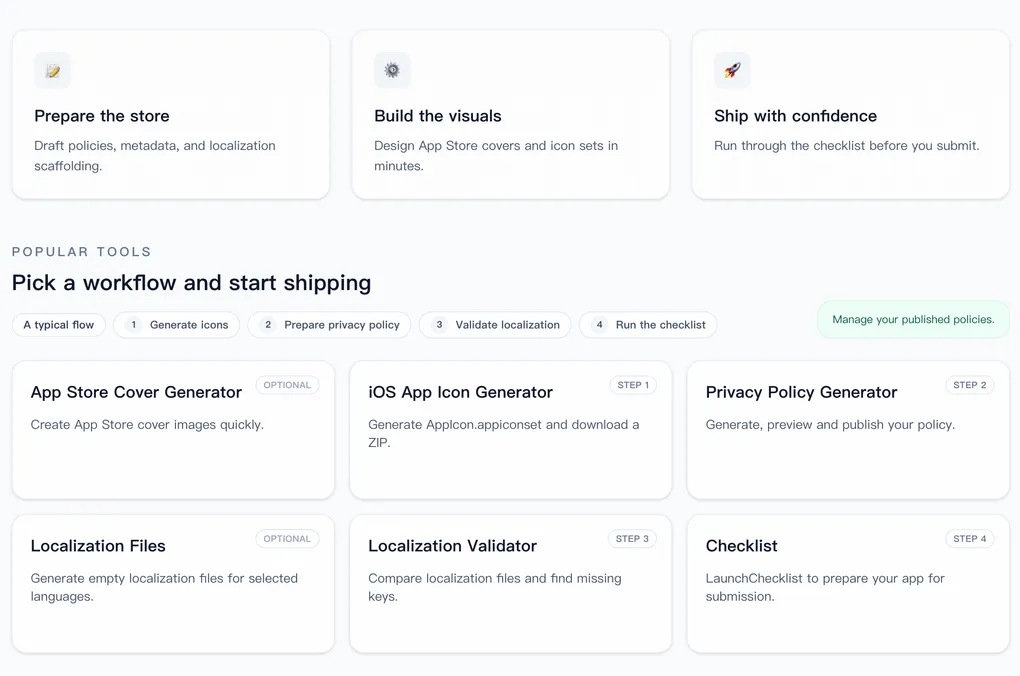
The homepage breaks launch prep into three modules, mapping to three things you will always do before review:
1) Prepare store info (Metadata & basics)
Solves “Are my submission materials complete and consistent?”
When you need to finalize app info, policies, contact details, and metadata, this is the most reliable place to start.
2) Create visual assets (icons / screenshots / covers)
Assets affect both review compliance and conversion.
The homepage concentrates icon and screenshot/cover workflows in one place, reducing the cost of hopping between tools.
3) Submit with confidence (final checks)
Before you submit, you don’t need to “do more”—you need to “make sure nothing is missing.”
The checklist module exists to scan the risk points in one pass at the final step, reducing rejections and rework.
A recommended App Store submission flow: cover core risks in 4 steps
The homepage provides a “typical flow” that strings submission prep into four steps:
- Generate icons
- Prepare a privacy policy
- Validate localization
- Run the checklist
These four steps cover the most common review blockers for indie developers: visual standards, compliance docs, multilingual quality, and submission completeness.
Even if you don’t use every tool, you should at least run through these four steps.
The 6 built-in tools: what common problems does each solve?
LaunchCheck isn’t “a pile of tools.” Each tool maps to a specific launch risk.
① iOS App Icon Generator (Step 1)
Solves: missing iOS icon sizes, messy export formats, and failed Xcode imports.
Generates a standard AppIcon.appiconset and packages it as a ZIP. Download and import directly into your project to avoid missing sizes and structural mistakes.
Best for: first-time launches, icon updates, and quickly aligning to spec.
② Privacy Policy Generator (Step 2)
Solves: missing/incomplete/misaligned privacy policies that don’t match your actual data collection—leading to review requests or rejection.
Generate and preview a privacy policy page, then publish it as a public URL for App Store submission and compliance display.
Best for: indie developers, or anyone using third-party SDKs (analytics/crash reporting/ads/payments) who doesn’t want to handwrite a long document.
③ Localization Validator (Step 3)
Solves: missing keys, inconsistent placeholders, and structural differences that cause runtime errors or a broken user experience.
Compares your localization files and highlights missing and inconsistent items so you can fix them before submission.
Best for: scaling from one language to multiple, or projects where localization starts to “drift” across releases.
④ Checklist (Step 4)
Solves: forgetting critical items before submission—you think you’re done, but something always slips.
Turns common submission requirements into an executable checklist. Run it once before submission to reduce rework and rejection risk.
Best for: quick pre-release verification every time, or standardizing “pre-submit checks” in a team.
⑤ App Store Cover Generator (Optional)
Solves: missing screenshot/cover assets, inconsistent style, and low efficiency when you’re designing at the last minute.
Helps you produce “good enough, usable” visuals quickly, so at minimum you’re not blocked by asset issues.
Best for: teams without design resources, fast asset catch-up, or lower-cost iteration on screenshot presentation.
⑥ Localization Files (Optional)
Solves: no structural template when adding languages—copy/paste is error-prone.
Generates an “empty structure” for selected languages so you can quickly build a multilingual skeleton, then use the validator to enforce consistency.
Best for: adding new languages without a mature localization engineering workflow yet.
Who is LaunchCheck for?
If any of the following describes you, the homepage will be a strong fit:
- Indie developers: want faster submissions and fewer rejections
- First-time launchers: need clear steps and reusable templates
- Small teams: want standardized pre-submit prep, less “memory-based” work
- Multilingual products: localization frequently misses keys or placeholders don’t match
- Anyone who doesn’t want to spend time on “manual paperwork” and “rework debugging”
How to get started (fastest path)
If you want the most time-efficient and reliable way to finish submission prep, do this:
- Run through the 4-step “typical flow” first
- Then add as needed: cover generation / localization files
- For every release, come back to the “checklist” for a quick verification pass
This turns submission prep from “last-minute scrambling” into “repeatable execution.”
Closing: make launch prep a process, not luck
App Store submission isn’t mysterious—it’s a set of tasks that can be broken down, validated, and standardized.
What LaunchCheck’s homepage does is bring those tasks together: generate faster, validate earlier, and verify right before submission.
If you’re preparing to launch—or you’ve been through rejection and rework—hopefully this site helps you avoid detours and keep your time for the product itself.